Tuesday, September 21, 2021

India BSNL - KYC Frauds Beware - Add complaint

If somebody has BSNL number be aware of frauds wrt disabling sim if "KYC not done". This is a fraud - Do not call any number in such unsolicited messages.

I will add formal complaint and update the reply from BSNL.

How to figure that this is fraud ?

1) The sender is not BSNL but a private looking number.
2) The number they are asking to call is a BSNL Private number - and not call center.

Think how a BSNL customer care which is notorious for it's customer care service will provide you a private number to reach out to ? 

Highly unlikely - and these are fraud.

(Screenshots pasting as received.)


Friday, September 10, 2021

Bluetooth Audio Quality - SBC XQ Codec - Linux Pipewire Support

How often you use a bluetooth headset and never satisfied with quality of Audio reproduction 
you get ?
Now often there could be few reasons.
1) Bluetooth Headset earpiece quality itself.
2) Audio codec supported / in use. (SBC, AptX, AptX HD, AAC, LHDC, LDAC and more).

Normal Solution: Buy a better bluetooth audio headset with better audio codec support for better audio quality. LDAC, LHDC , AptX HD etc.

Possibly Better Solution: Use SBC-XQ audio codec on existing HW allowing higher bitrate on existing Hardware, which can save you from just throwing away your headset. 

On Linux:
Pipewire is in-place replacement library for PulseAudio (default on any Linux Distro till now) and thanks to better Bluetooth Support in pipewire and SBC-XQ - it just blows on the quality of sound reproduction that you can get from your existing Bluetooth Hardware. 

On Android custom ROM (Lineage OS and derivatives). SBC-XQ is supported - read here.

More details on SBC-XQ here. It allows bitrate as high as CBR, 551.2 kbit/s.

Things to know - 
  1. Archlinux(and Manjaro) and Opensuse Tumbleweed include latest Pipewire in their repository as default replacement to PulseAudio (Old library for Linux till now). And in my experience this works great on Manjaro. (search Pipwire in your Package manager)
  2. Windows 10 / MacOS do not support  SBC-XQ as of now. Anyhow they do not allow to force the audio profile that should be used. See google and there are requests open for both OS. Something Linux does really well.
  3. Screenshot below on once the Year 2015+ Bluetooth Hardware is connected. Linux can show SBC-XQ audio profile.


Image 1: Pipewire on Linux supports SBC-XQ with bitrate as high as 551.kbit/s

Let me know in comments if this works for you or any other further improvements / hack around this.


Wednesday, February 10, 2021

Why not to buy Macbook Pro in 2021

At the start want to mention that this is not a fanboy bashing against Apple / Macbook Pro Devices, But recently the quality and reliability has gone down on Apple Products.

What works for all these human interface devices is to have a device which can work in and out reliably as you need it. Apple has been doing that with their unibody design MacBook Pro up until 2016 - post which we had the touchbar design MacBook Pro with filmsy butterfly keyboard without magsafe charger and all down the drain features.

Here are the things that you should consider / account before deciding on next apple device.

  1. Display issues : Horizontal - vertical flicker lines on screen - There is definite design issue with macbook pro sol from 2016 and 2017 also. Apple has acknowledged the issue for 2016 Models but have been declining that issue exists in 2017 models.
    • Here is the link to Apple Advisory for 2016 Model Thunderbolt Port Mac - here
    • 2017 MacBook pro users have been informing apple about it but to no avail.
  2. Graphics issues : Apple is known to have graphics issue with their MBP line of product which again they never accepted it early on. Only to launch advisory after 6 years of manufacturing defective devices. 
    • All external graphics card Mac from 2009 and 2010 had graphics issues. with defects as bad as graphic chips becoming loose over time due to usage.
      • for 2010 Macbook pro models with Nvidia 330m - Macworld Article here & Cnet reporting it here
      • Same is the case for 2009 AMD Radeon Models - a quick Google search on this would show up forums filled with this.
      • Also the issues were not only with MacBook Pro But the iMac's also.
      • This was all later taken care by an advisory but that the service program is closed now.
  3. Butterfly keyboard issue: If you are Power user of 2016 Mac book pro you would have seen this already. extra keyboard presses showing up and making the device unusable for the moment and this can happen again and again.
    • Apple already has advisory for this. If not already replaced visit the Apple service center already. Applicable to Macbook Pro, Air and normal macbook models.
    • Again a quick google search with Terms - Butterfly keyboard Apple extra key - will lead to forums filled with apple users cribbing about design of this.
  4. Battery not charging issue in Big Sur: here you go - so your battery can get discharged and may not get charged back again, due to a bug in Big sur.
  5. Other apple advisory for Battery issues:
    • Apple 13" Mackbook Pro no touchbar Macbook Pro battery advisory
    • Another 15" Macbook pro Battery Advisory


Considering the list of issues hogging behind the Apple MacBook Pro series, My personal opinion is to stay away from Macbook Pro Series. They are costly and reliability that existed before and demanded the higher price is no more applicable.
A good read also is from Macrumors folks mentioning that they also don't suggest to buy and wait for suture mac devices - But then again new devices will show newer issues if Apple continues to not take cognizance of issues seen and just pulling them under the carpet.
I expect 2017 Macbook pro devices to also have an advisory for their manufacturing defect - but I am not in World's richest country to make that claim to them directly. Sigh!

Disclaimer: These are personal views and the links provide views of respective owners.

Tuesday, May 14, 2019

Amazon Pay is unsafe to use on other sites. (No OTP for consecutive Transaction)

Amazon Pay is unsafe to use.
RBI mandated OTP authentication for online transaction but Amazon pay still doesn’t do the same and this is really unsafe. 


Seemingly, lot of bookmyshow.com accounts are hacked and they have sent mail as above but Amazon pay not having 2 factor authentication causes bigger problem.

My Bookmyshow.com account was hacked and a Ticket in Diamond class was booked at a different city. Somebody booked ticket at Friday 11:30pm for a 9am show next day.

Update: I will write separate post on what happened with bookmyshow.com and why it isn't a very safe. But Amazon Pay not having 2 Factor Authentication also is unsafe.


Remove Auto Login for Amazon Pay.

Here is what you can do to atleast remove Amazon Pay login - so that you are not defrauded in any way.

Go to Amazon.in -> Your Accounts -> and look for "Login with Amazon"


Clicking should get to page where it will show all Accounts that you have Amazon pay linked with. Domino's, Swiggy, Bookmyshow.


I removed all of them and don't intend to use thru Amazon Pay on any other site till they have 2 factor Authentication.

update: 5/21/2019
Amazon has reverted the charges. but they still do not have a answers with respect why no OTP. Also I have removed any login I had for Paytm account.

Tuesday, July 31, 2018

Call Drops - Airtel issue. Set to 2G only - not an issue on vodafone.

I have had a set of Call failures on Airtel number, these have been happening and I decided to check some details.
Call Failure on Airtel, Sigh! :

Voice coverage on old Operators(Vodafone, Idea, Airtel) is better in 2G than on 3G or 4G towers. So decided to force 2G as preferred on Iphone 5s for airtel sim. Checked settings and there is no option which allows 2G on a Airtel sim. see screenshot 2:


No option to select 2G on Airtel, why ?: 


Now checking the same setting on Vodafone sim this allows setting 2G as preferred sim on iPhone 5s.
And there I have no call drops when Vodafone sim is used.


See the full signal when Vodafone 2G is selected and that just works. No call drop on my secondary number.


Now decided to reach Airtel on all of this, But they aren't able to understand the issue. Reached them on twitter - they checked and still not able to root cause or provide the solution.

For now I will just use Vodafone as a temporary secondary sim.


Monday, April 2, 2018

Facebook delete Account ? Mostly not, but do fix Apps permissions access

So Elon Musk deleted Facebook accounts for his Companies. So i decided to check what more privacy thing is available that I can take care in my Facebook account. Since all the Leak of user data had happened thru the developer Apps - I decided to check which Apps have access to my Facebook data. Funny(/Scary) to see I had some stupid app back from 2009 also still having access to my Friends list and Pages I like. Why they need this.

Removed all the Apps and kept to bare minimal Strava and few more.

This link provides to see what app you have as connected.
https://www.facebook.com/settings?tab=applications

1. Removed many apps and now it looks like this below.


2. Further more there is settings box which shows up like this below:
Simply put - this controls Apps how they use Facebook authentication etc. Just turned it to off for my account. 


This setting should take care how my data is shared by my authentication, but this doesn't answer as to how if one of the friend has provided access to some app - would that mean the App would still have my demographic data ? 


Awaiting to reach out some folks to have an answer on this.

Monday, October 12, 2015

Windows Multiple desktop like Linux

I definitely prefer atleast dual desktops to work with and coming from the world where have used Linux and Mac OS both support Multiple Desktops in full glory - I was bit disappointing with my Windows 7 Installation that i am working with these days.

Gave a quick google to find if a full 3rd Party solution is present for dual(or Multiple) desktop in Windows. But I din't need to go further. Microsoft bought a company Sysinternals which has a tool which enables this hidden capability in Windows 7.

So yes you have Windows Multi-desktop support by default in OS but looks they disabled it.

Here it goes - download this 61k utility (yes its not in MB's only in KB's) 


I am still working with kinks of moving an open App from one desktop to other - but this is good to start with.

Friday, October 2, 2015

Moving to a bigger screen size Phone and 4G 800Mhz FD LTE supported phones.

I am somebody who prefers to just use enough technology that it helps in real work and not be a distraction [something I find it otherwise - Colleagues, friends, kids all being addicted to iPad etc - Not realizing the fact that even Steve Jobs himself didn't let his kids get on to iPad/gadgets in early age - here].

I can continue ranting on this but i will keep that for another post. My predicament is my 3.5 each Cupertino designed phone is finally something that i want to move ahead from. Small screen for feedly posts that I prefer to read or the news that I follow + that spreadsheet table in email is being notoriously asking me to change.


So i start looking for available options 4G LTE options in market. But why companies are selling LTE models which support only 1900 or 2300MHz freq for 4G. Reliance Jio which is planning to launch 4G countrywide is bound to use the ~800/850 Mhz along with RCOM (news - ET here and more here) and serve 4G over that. So current 4G phones in market will not support those (?).

Let's check that.

1. Meizu M2 Note - which has a iPhone 5C like build, only bigger screen - supports following networks :

(Source: Meizu India page, and Amazon.in listing)

2. Xiaomi Mi4i - Another Full HD screen, 4G phone.

(Source: Mi.com India Page.)
Trouble understanding conversion to actual frequency being supported by this India version.
Here:

As is clear Xiaomi Mi4i also doesn't support the band that Reliance Jio might actually launch 4G services on making this 4G Phone buy not worth it.

Lets try another one. Branded Samsung (Hey were rated no #1 Brand in india - How (?) - that's another story)

3. Samsung Galaxy A7 4G - Surprisingly Samsung has been able to account the Plans of Indian Service provider to have 4G service offered on ~800MHz. They do support 4G FDD-LTE on ~800 Mhz.
  •  4G FDD LTE  - B1(2100), B3(1800), B5(850), B7(2600), B8(900), B20(800)
  •  4G TDD LTE -  B40(2300)
(Source: Samsung India Product page for Galaxy A7).


I checked out of curiosity for one of the other Popular sellers in Market Lenovo K3 Note.

4.  Lenovo K3 Note:
4G LTE (FDD): Bands 1/3/7, LTE (TDD): Bands 38/39/40/41
See the equivalent Frequencies for this band here - yet again this doesn't support ~800MHz 4G frequencies.


Search is on - I will find a model which serves my requirement. But posting this here as I find all 4G offerings aplenty available in market - being tagged as 4G devices, Indeed they are, but may not remain usable once the services are launched. Only the Samsung galaxy A7 looked ready for this. Let me know in comments if any other good current model support 800 Mhz Bands for FDD LTE.


Saturday, May 9, 2015

Why not to upgrade to Yosemite ?

My idea of computer is that its a content creating device unlike tablets and smatphones are just content consuming devices. And hence a much more reliabity of things is needed on a Laptop/Desktop than anything else.

Apple has inbuilt a reminder mechanism on Mac for updates and Yosemite upgrade has been popping up for months - I don't like disrupting already working flows and hence had defered any upgrades.

Since Yosemite finally moved to a stable 10.10.3 version now - I wanted to take a look if its good idea to move to Yosemite.


For starters the human interaction part of any computer is important for seemlessness - this includes display. Now a non starter for me was Helvetica Neue font in Yosemite - though this might have been taken as measure have consistency with iOS - but going back to definition iOS and OSX device have different ways to be used - different sizes these device come in.

Looks various user are already outpouring on this --
http://gizmodo.com/designers-explain-why-apples-new-os-x-typeface-is-a-str-1585123982
and
http://forums.macrumors.com/showthread.php?t=1768362

Further github now has a way to change the default font to Lucida Grande (which has been default for all OS versions by Apple till now):
https://github.com/schreiberstein/lucidagrandeyosemite

But then again why to upgrade to OS which doesn't provide anything extra that really adds/helps to my flows/work. This is just the first one issue I see as non starter - But forums are full of thread on  new Photos app - again added to have consistency with iOS is also a step back in terms of functionality of iPhoto.
links here - http://www.imore.com/ios-8-kills-iphoto-messy-transition-photos

Yet to explore what more could be wrong with Apple's new OS Yosemite. But I might remain on OSX 10.9.x for sometime more till there are security updates for this 1.5 year old OS.

Tuesday, April 14, 2015

iOS 8.3 update on iPhone 4S, Apple pls get into security fixes only mode.

It surprises me that feature that is highlight for an iOS update is Emoji  [The upgrade text in for iPhone says that], and still people go berserk almost about the products [read 1 million Apple Watch devices pre-booked on day1]. Though iOS8.3 might have various other security updates but it surprises how people react to it.


That's people choice, but seriously there are more pressing things in world then to think about this emoji. :)

I am not updating to iOS 8.3 because of multiple threads in Apple support communities opened anew after iOS8.3 upgrade by users.
1) The cable not recognized issue - here
and 2) issue with wifi being intermittent - here

If looking for complete list of fixes in iOS 8.3 look here - official Apple page.

Point is Apple should get into security only fixes for devices like iPhone 4/4S instead of keeping them feature heavy and possibly issues like this. I swear by the performance of iOS 7.1.2 on iPhone 4S[which i don't have anymore]. iOS 8.x has been comparatively slower but usable for certain.

Friday, November 29, 2013

Frequent Firefox Updates.. (Solution Use Firefox ESR)

Are you bugged with Firefox update just happening too frequent. I am one of the people who actually uses the option that notify me for updates and I update software when I am not really not working up on something.. I believe in minimalistic things as far Operating systems and Application are concerned. Operating Systems and Applications are there to help you do the work - be it booking a movie ticket/Paying a bill or a full fledged coding work. I belong in second category.


Things important to me:
1. All security patches updated for browser.
2. A Working fast browser

Not important to me. (or things that don't work for me) :
1.  Bloating of software with new features - none of them i would use.
(I actually cant remember any major feature given by Firefox that adds to my productivity - its same browser capabilities that i need)
2. Continuous bloating of the software when running in memory. as of now firefox when used with 1 new tab still uses 150mb of active paged memory.


Other day i found solution to this.
Firefox ESR. [Extended Support Release]


Firefox maintains multiple release channels - Beta update, Release channel and this is one another channel ESR. This channel receives security updates and nothing else for 9 iterations of Firefox release channel updates.

eg. Firefox 17.0 will continue with series 17.0.1(includes security updates in Firefox 18) and .2(includes security updates in Firefox 19) and so on with finally upgrading to Firefox 24.0.2(which would be equivalent to Firefox 26 security updates). Now this numbering can change if there are out of turn important fixes but still these won't be botheration as you can choose when to install and these security updates i have seen to be in Kilobytes at max.

Link to download Firefox ESR in your language/platform here.

You would be surprised to see that this is part of Firefox charter to not offer this release channel directly from there home pages. see last point in here :)


Let me know if this helps or you have found other solutions to this.


Tuesday, June 12, 2012

Laptop - evolution - Asus Taichi - Windows 8


Always there is time in technology arena that something so good comes-in that it has potential to change the way things work and that time is now. Laptop Generation is continuously being bombarded with innovations and design and recently the Tablet market creating its own space. But I ended up seeing the grand offering Asus Taichi showcased at Computex 2012. Innovative dual display sleek design of Asus Taichi is a sign enough to see what could be expected in Laptop arena in coming days.


Asus Chairman Launching Asus Taichi at Computex 2012:
(see the demo though I found it little hard to follow to slowly speaking Asus Premier, No Offence. ;-))


One of the important things that i think for laptop are the displays - I read a lot on laptop. And Asus Taichi pack HD IPS display with resolution 1920x1080. Primary display which lets you use it as a laptop and When the lid of laptop is closed metro UI is available on the secondary screen and its just a touch thin device. Running Windows 8 this is available in 11.6 and 13.3 inch models. This also packs in the Ivy-Bridge Corei7 processor with 4GB RAMs, so performance isn't something that should be doubted about these laptops.  It just looks polished - I am one of the few folks who doesn't like android interfaces on Tablets. (The reasons there of I will put in another post). I doubt that this would be available in India anytime soon.

Let's hope Asus decides to launch it here too.


Saturday, January 14, 2012

Reviving the blog.

2012 has come back with lots of things that I want to get back to, and that includes reviving this blog. My focus on technology is to make things simpler and easier -  to reduce time it takes to do something - to do something innovatively - or maybe to just do the normal chores more peacefully with ease.

Examples of me keeping things simple.
1. Used Nokia N70 high tech phone of its time for last 4 years until recently when I changed to an Android.
2. I still have a AMD Sempron 2500+(1.4Ghz only, muhhahah) k8 architecture Desktop which my mom uses at home. We decided not to upgrade as it is still faster than many PC;s and works as breeze. Just keeping pace with my Macbook Pro.
3. Look at my old post why we don't need faster more power wattage CPU here.

Coming back on reviving this blog.
I will keep myself on themes:
1. Doing faster - easier 
2. On Applications that enable us doing so..
3. Mac - what keeps or helps getting my work done - which can be of use.
4. My experiments and optimization for android for keeping it simple and quick to do things.

Chow for now!


Tuesday, June 24, 2008

The Best Quality Minimum size codec is here. AAC (mp4).

MPEG4 standard is the forthcoming thing for Audio and Video. For audio it is variation of AAC(Advanced audio codec). Apple iTunes already sells .m4a which is nothing just another implementation of MPEG-4 AAC.

This codec helps saving space with small handheld devices/mobile phones. A normal 4 minute song might just take little over than 1MB with very-very good quality, and no much apparent lose in quality, unless you are an audiophile you will love it.

Below are the different versions of AAC.

  • AAC -> Normal AAC, all iTunes store files in this format.
  • SBR-AAC(Spectral band replication) or AAC+ or HE-AAC -> good sound quality even at 45kbps
  • PS-SBR-AAC(Parametric Stereo w/ SBR) or eAAC+ or HE-AACv2 -> smallest size, good at as low as 28kbps.(effectively only 700kb for a 4 min song.)

I have been using this codec for all songs to be copied on phone for quite some time, finally penning it down here.
you will need two utilities.

Download and install this utility foobar.
http://filehippo.com/download_foobar2000/ - 2.53Mb

Download Nero Codec
http://www.nero.com/ena/downloads-nerodigital-nero-aac-codec.php - 1.7 Mb
That’s a mpeg-4 audio implementation by Nero, a deutsch company.
Unzip this to folder C:\Program Files\Foobar2000


1. (Optional) – performance thing only.
Go to foobar2000 program directory and delete neroAacEnc.exe and rename neroAacEnc_SSE.exe to neroAacEnc.exe. Normally all the PC have SSE instruction, unless you have some old 486 or 386 which nowadays nobody keeps :). this will enhance the speed of encoding a file


2. Open foobar, Drop the media file onto foobar, it will start playing immediately.
Stop the file if you don’t want to listen at the moment.
Select convert to same folder in context menu of file.

(click on image to view image full size)
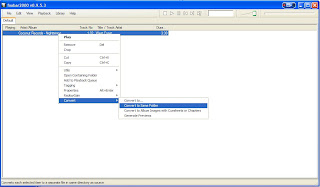


3. Select mp4 in next window.
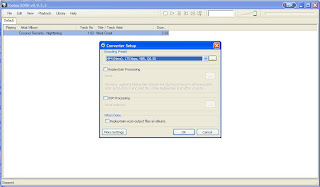


4. Click on ellipses button in after selecting mp4 from dropdown.
Below screen will come up.
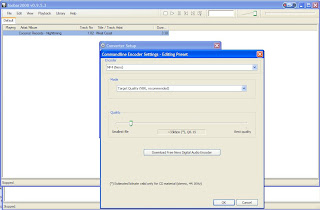


Keep the target quality as “VBR” but change the quality to 33 kbps (this will encode file to e-AAC with Parametric Stereo).
Press “OK”.

5. Select ok in next window this message will pop up, say yes.
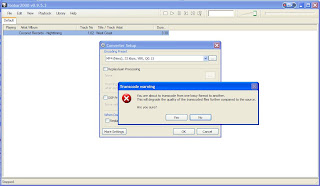


6. Foobar will ask to locate the neroAacEnc.exe so you can browse the place where you have unzipped it.
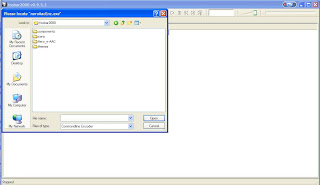


I have unzipped my codec to Nero_e-AAC and will select from there.

And you are done;) foobar will save your compressed media file in the same folder where original file resides.

You can try various other bitrate to suit your needs. But normally selecting a VBR 48kbps is good for listening on computer and Mobile.(the output mp4 will be in HE-AAC) But want more compression with very less loss to quality, choose VBR 28 or VBR 33 which will give use HE-AACv2(Parametric Stereo).


Just one thing more here if you want to play these files, they won’t work out of the box in windows media player. But Foobar itself, and Winamp, along with media player classic can easily play such files.

cheers/ Anurag

Saturday, June 7, 2008

Intel Quad Core Processor, do we need it...?

Intel has started shipping its Quad Core processors for the Desktops, And Recently I came across an Advertisement from Intel saying Quad Core PC's start from Rs 25990/- Price Range. But My Idea is :
Do we really need it....?

For all the requirement for ppl at home, is just a decent Machine which can perform all the task of Word Processor, email, Browsing, and all those similar things.
See the spec for the Intel's newest Desktop Processor, here, And see that the Processor Consumes 95W power Which is much more than many of the existing processors.
I am not against Technology, But the idea to market the term Quad core CPU for Consumer Market like home is all crap. For Enterprises Intel can plan moves as they want it, But Its bad to even think of a quad core processor based Machine for home use.
Unnecessary wastage of electricity with effective additional output that's what are intel newer CPU's are.

Friday, February 1, 2008

Call Filter : Block unwanted calls

Pushed marketing has become such a huge business for various companies that they take it as for granted to disturb customer over his mobile every now and then. And Bangalore is one the cities where you can find to its utmost limit.
I had issues with vodafone (back in october) as they told me that DND will be active not before than 45 days time, so i decided to figure other way, and it is this.

All symbian Mobile phone users can install a free application 'Call Filter' and block numbers from which they don't want to receive calls. download here

here is some description from the site.

» CallFilter Description

Call Filter is a utility application realised under the concept "Simple Yet Efficient" for your Symbian devices. It allows you to hang-up any incoming calls from contacts selected as a filter rule in main application screen. Gives you a very convenient and quick access to block/unblock some phone number at runtime. The logs screen maintains a list of rejected calls and allows placing a quick call or an sms to the rejected phone number. So this is what we call "Simple Yet Efficient".

- Blocks unwanted calls
- Allows block/unblock calls on the go ..
- Maintains a log of rejected calls .. and allows to send an sms or make a call to the rejected caller immidiately !
- The best of all .... its Freeware


cheers,
Anurag

Wednesday, September 5, 2007

Fed up of web Advertisements! Block them all.

Really fed up of Advertisements, go to any forums, or news site and you will find whole lot of ads, even the Yahoo mail has an irritating flash ads all the time coming, and similar is the case with Hotmail and aol. Google itself has adsense service and other sites like Zedo, yahoo and doubleclick do provide web advertising services.... which actually pay the owner of site too... I don't say that its bad that site owners are getting money, But many a times it becomes irritating to read the real stuff. I have seen sites which had over 13 ads on a single page. Moreover these ads can eat up bandwidth who have limited broadband bandwidth connection( ie 1GB per month etc.)

Mozilla Firefox provides with a very good solution for it. Adblock plugin which can be downloaded here can block a whole lot of ad service pulled ads. After installation it shows up in bottom-right corner in firefox. Though initially there are no settings and you have to build your own filters over time, But here is the filter file that has been updated as I browse over Internet. right click the bottom right corner adblock icon and open preferences, and then adblock options -> import filter upload the filter file and you are done.

Disclaimer: this will block the google adsense and you won't see them, if you like them, you can remove that from preferences :).

Finally your eyes are spared from seeing all the crappy ads.

Getting email confirmations

Here is an Interesting thing that I found with Mozilla Thunderbird.
The actual email interfaces as initially developed(RFC and all) allows a mail to get a confirmation as soon it is read by its receiver, back to the sender. But this facility is available in corporate business mail accounts only. The mail sent from free email services like yahoo and gmail don't ask the receiver for any "read confirmations" neither they can reply a "read confirmation" for the mail these free accounts receive.

But here is the thing, I figured a catch to this and here it is. Gmail allows an easy SMTP interface to access and send mails thru its email clients like Thunderbird. so what I do is I just configure Mozilla Thunderbird to receive and sent emails thru my gmail account. Thunderbird has the capability to ask for read confirmation for all the mails sent thru it, and this does the work. so I actually request read confirmation for all my mails, but point to be noted is that "read confirmation receipts" can only be received for mails sent to corporate mail ID's and not to free accounts like yahoo and gmail itself as these don't allow any read confirmations.
Still It solves my purpose, The important mails I send are directly to corporate ppl and I am able to track that , at no extra cost what More I can expect from the free email service. Google Rocks!, It provides complete services to users and finds a complete different channel to get revenue(the ads we see in the sidebar.) Pretty decent enough.
Also Microsoft too offers Windows Live mail client (download here) which can be used to access hotmail(and gmail too) accounts on PC. Effect of competition. Still proprietary so no other email client may use it.


Disclaimer: This is totally receiver's domain dependent, though it has worked for me, but can't say it would work for all domains. If it doesn't work with any domain,Let me knw I will post it here.

Optimization \:)/

Optimization seems to be the keyword for many of the things in the industry, Google asks question and then makes you optimize from n² to nlogn and finally logn. whatever…(lookout for there qns they are really cool though)

I do like things to be optimized, even my life. getting things done with minimum chaos which doesn’t happen normally, Nevertheless, here I am putting some of techniques ,optimizing my 1.4Ghz Computer(yeah it sounds slow, but its actually a fast AMD64 with superb performance).

The first optimizations I normally do just after installing windows is to disable the Animation while minimize and Maximizing windows actually you can see that in the following image, only the checked items I keep on, rest all options I just uncheck for performance.
access this as below —> right click on my computer —> properties —>advanced—>performance settings—>(1st tab itself)
here


I find people going for the costliest hardware they can afford, even when they may not need it. I like optimizing the stuff I already have and using it to max.

India BSNL - KYC Frauds Beware - Add complaint

If somebody has BSNL number be aware of frauds wrt disabling sim if "KYC not done". This is a fraud - Do not call any number in su...